Enhance Your Gaming Experience with DLSS Swapper
Easily manage and swap NVIDIA DLSS versions for optimal gaming performance
Latest version: v1.2.5.0 · Updated Jun 27, 2026
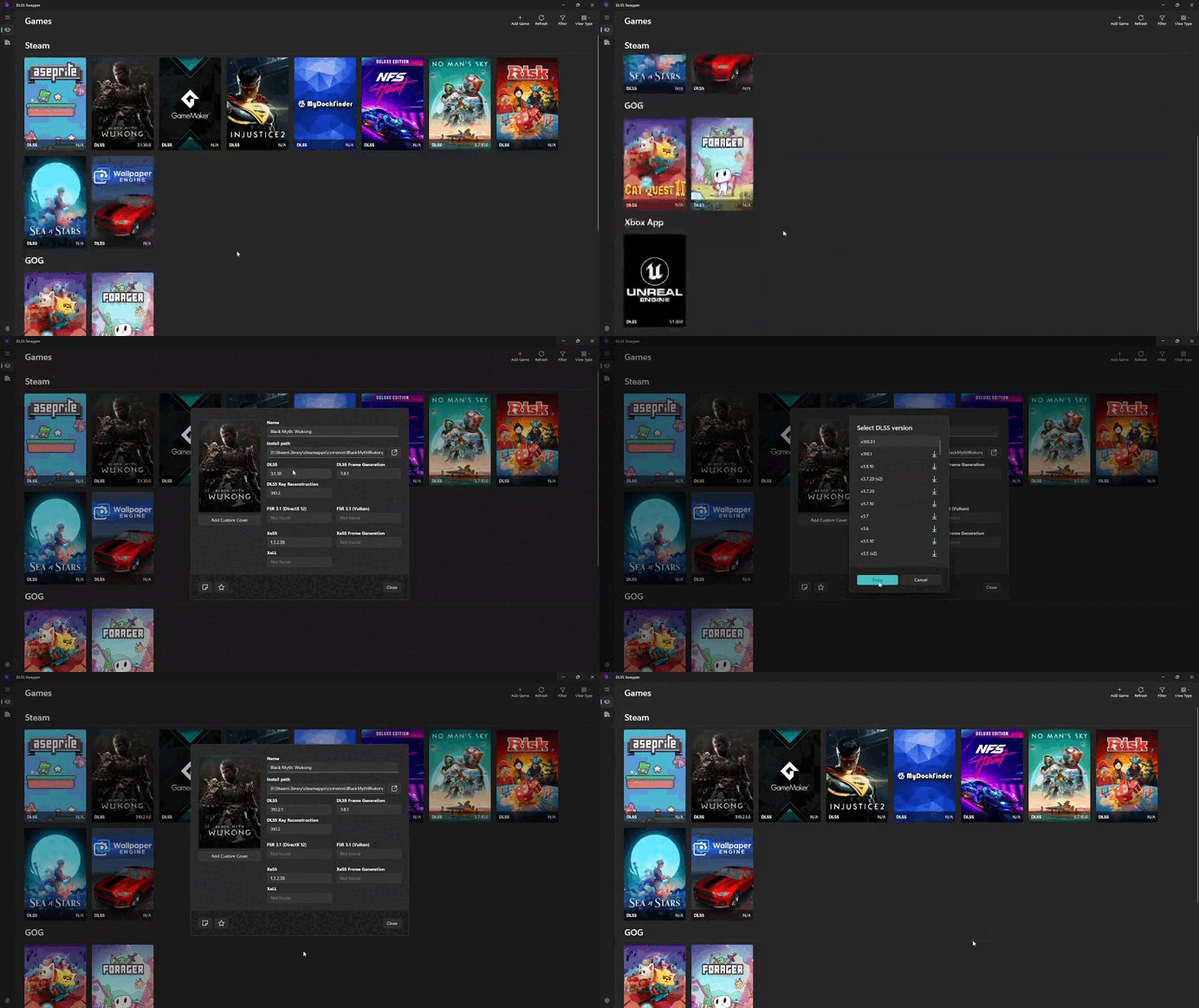
Easily manage and swap NVIDIA DLSS versions for optimal gaming performance
Latest version: v1.2.5.0 · Updated Jun 27, 2026
DLSS Swapper is an open-source tool designed to allow users to easily swap between different versions of NVIDIA's Deep Learning Super Sampling (DLSS) technology in games. This tool enables gamers to optimize their gaming experience by upgrading or downgrading the DLSS version used in a game, which can improve performance, image quality, or compatibility.
What sets DLSS Swapper apart is its comprehensive support for multiple upscaling technologies. Beyond NVIDIA DLSS, it also supports AMD FSR 3.1 and Intel XeSS upscaling libraries, making it a versatile tool for managing various upscaling technologies in games.
Switch between different DLSS versions to achieve the best balance of performance and visual fidelity
Automatically detects installed DLSS version in games, no manual file searching needed
Automatic backup system ensures your game files are always protected
Swap DLSS versions with a single click, making experimentation easy
Compare and test different DLSS versions in real-time for optimal performance
Clean and intuitive interface accessible to both beginners and advanced users
Go to DLSS-Swapper.Com and download the latest version. Choose between an installer or portable version.
Run the installer for a full installation, or extract the portable version to any folder of your choice.
Launch the application and it will automatically detect your installed DLSS-enabled games.
Select a game, choose your preferred DLSS version, and click to apply the changes.
DLSS (Deep Learning Super Sampling) is NVIDIA's AI-powered technology that boosts frame rates while maintaining high-quality graphics in supported games.
Yes, DLSS Swapper includes an automatic backup system that preserves your original game files before making any changes.
DLSS Swapper works with all NVIDIA RTX graphics cards that support DLSS technology.
Generally, newer DLSS versions offer better performance and image quality. However, some games may work better with specific versions. You can easily test different versions to find the optimal one for your game.
DLSS Swapper automatically creates backups. If you experience issues, you can easily restore the original files through the application or manually from the backup folder.
DLSS Swapper supports most games that implement DLSS. The application regularly updates its game detection database to include new DLSS-enabled games.